Quick-Start Guide
This page provides step-by-step instructions on how to quickly get started with your Jellyfin server.
For the super-impatient:
Go to https://media.menning.cloud and log in.
General Start
Download Jellyfin Media Player
As good as it works in the web browser, there’s a massive improvement if you use their Jellyfin Media Player and other native apps, as it is able to make use of your own device’s native encoding/decoding processer.
For other specific suggestions, check out this guide.
Change Password
You don’t really have to, but it’s good practice. Follow the quick guide here.
Change Library Order
Libraries are alphabetical by default, but it leads to the libraries y’all are probably most interested in (Movies and Shows) near the end.
Log in > Top-right Profile Dropdown > Home > Library Order
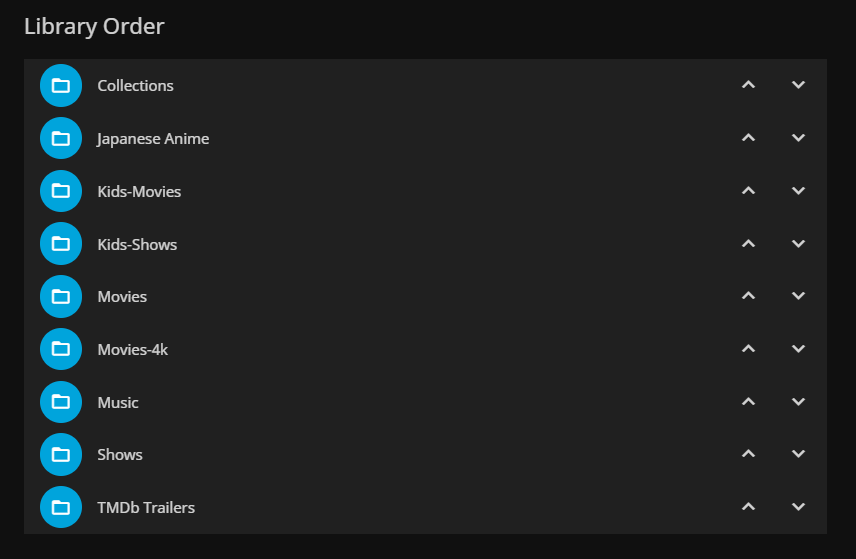
Adjust to your liking.
Request Movies and Shows
Are there shows or movies you wish the server had? Make a request, even if the movie/show isn’t out yet!
Check out the page on Jellyseer
Watching Movies and Shows
I have a normal Movies folder of 1080p movies.
I have a separate movie’s folder of high quality 4k versions. Not all movies will have 4k versions.
If movie starts studdering, might be an indication that my hard drives or internet isn’t fast enough. Couple options:
Transcode lower (new GPU handles transcodes really well)
Download and play locally (takes time to download, and 4k movie files are very large)
Feedback
Was this page helpful?
Glad to hear it! Please tell us how we can improve.
Sorry to hear that. Please tell us how we can improve.
Last modified July 3, 2023: added more info (d247f61)